 Canny Beats
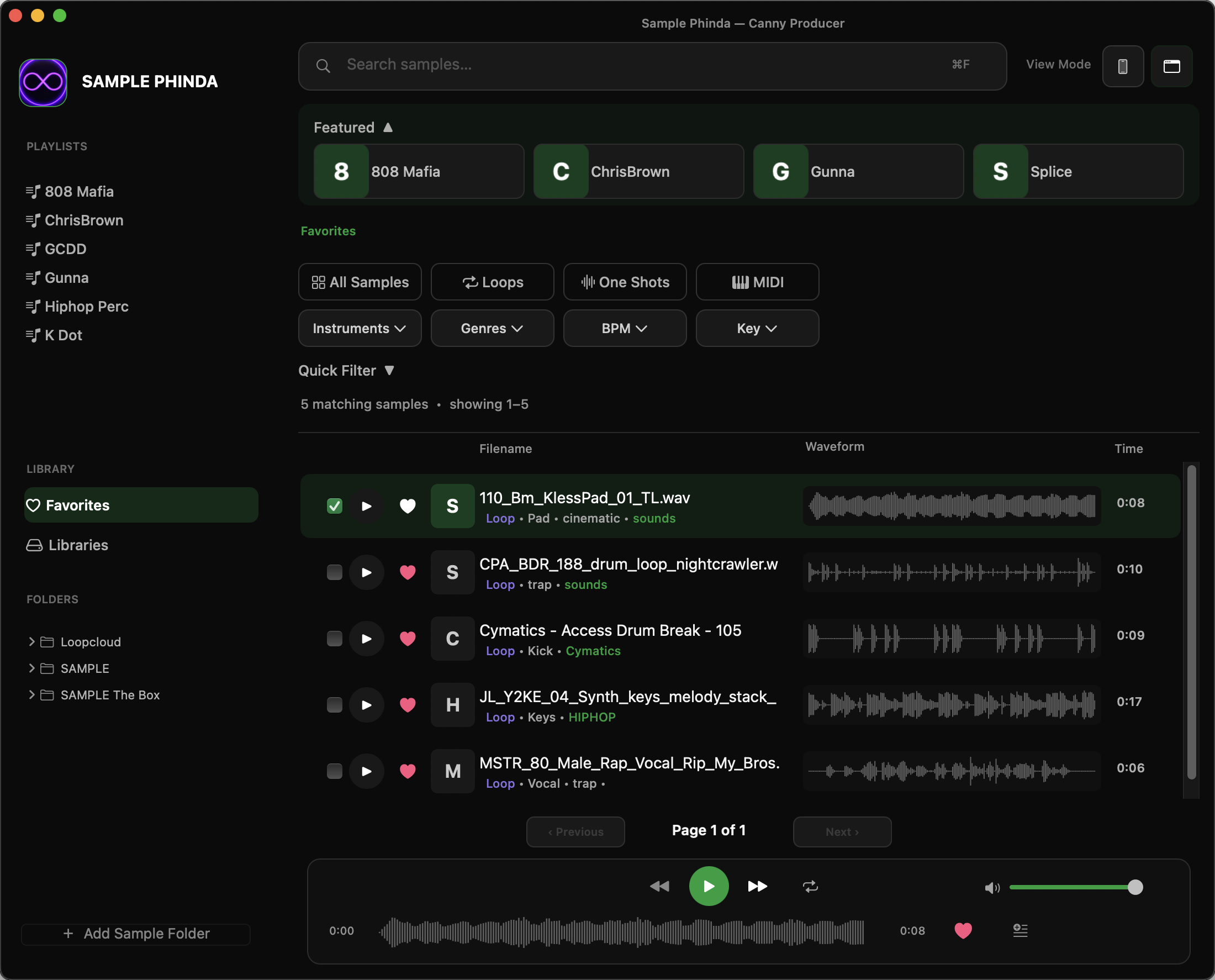
Sample Phinda (beta v0.9)
Download Link (direct): https://cannybeats.com/software_storage/SamplePhinda-0.9.0-macOS.dmg Developed by Canny Producer 🇻🇳 TIẾNG VIỆT 1. CAM KẾT AN TOÀN PHẦN MỀM SamplePhinda là phần mềm quản…
See details ↓Product information
Download Link (direct): https://cannybeats.com/software_storage/SamplePhinda-0.9.0-macOS.dmg
Developed by Canny Producer
🇻🇳 TIẾNG VIỆT
1. CAM KẾT AN TOÀN PHẦN MỀM
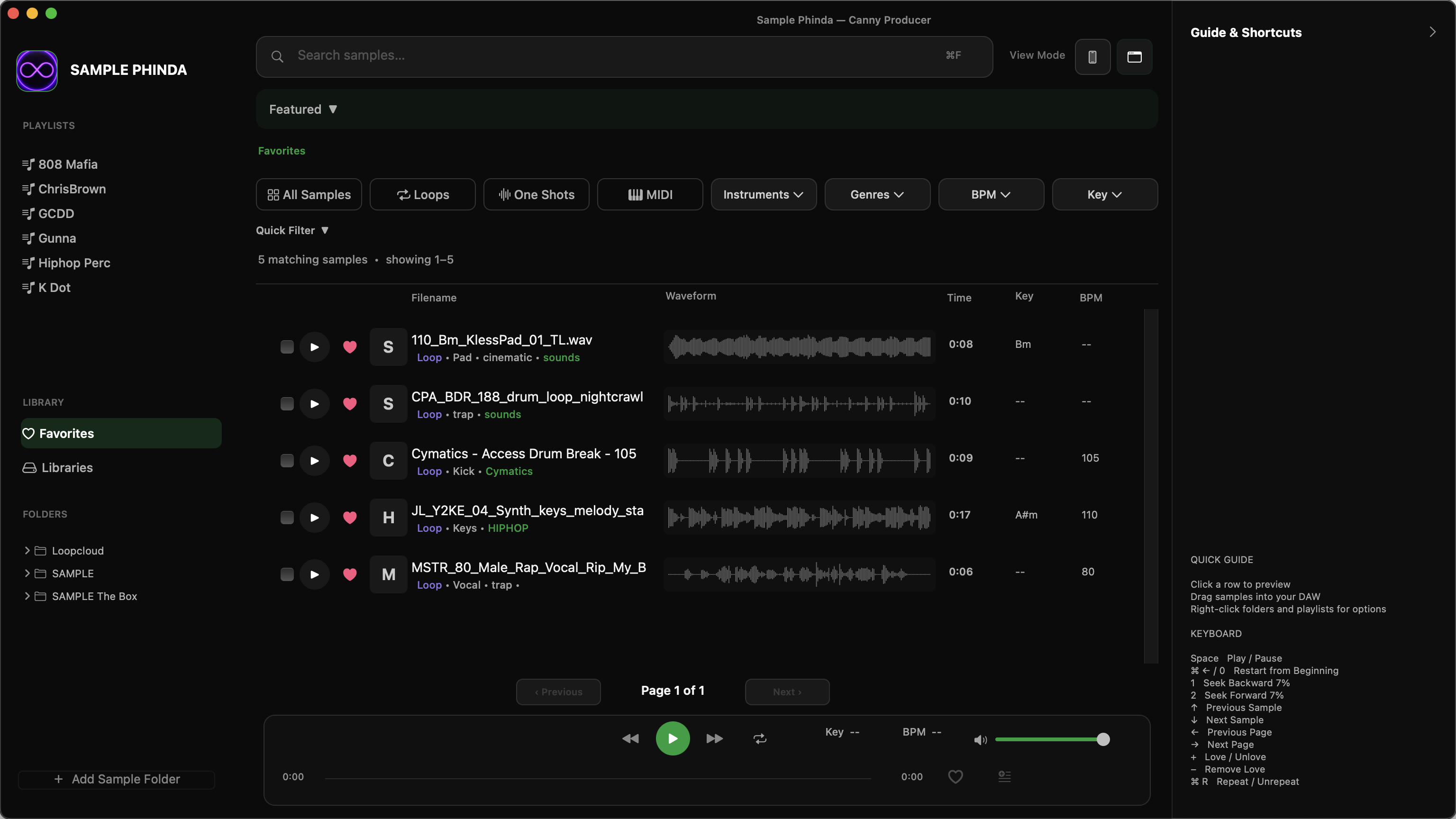
SamplePhinda là phần mềm quản lý, tìm kiếm và nghe thử thư viện âm thanh dành cho nhà sản xuất âm nhạc, được phát triển bởi Canny Producer.
Canny Producer cam kết đặt sự an toàn, quyền riêng tư và bảo mật dữ liệu của người dùng lên hàng đầu.
SamplePhinda được phát triển với mục tiêu không chứa hoặc cố ý tích hợp bất kỳ thành phần độc hại nào, bao gồm:
- Virus và Malware (phần mềm độc hại).
- Trojan và Backdoor (mã độc truy cập trái phép).
- Botnet và các công cụ điều khiển thiết bị từ xa trái phép.
- Keylogger (phần mềm ghi lại thao tác bàn phím).
- Spyware (phần mềm gián điệp).
- Ransomware (mã độc tống tiền).
- Các cơ chế thu thập dữ liệu trái phép.
Canny Producer không chủ động tích hợp các thành phần trên vào SamplePhinda.
Chúng tôi cam kết xử lý các vấn đề bảo mật được phát hiện và liên tục cải thiện độ an toàn của phần mềm.
2. TẠI SAO macOS CÓ THỂ HIỂN THỊ CẢNH BÁO?
SamplePhinda V0.9 hiện chưa được Apple notarize (chứng thực và xác minh qua hệ thống Apple).
Vì vậy, macOS có thể hiển thị cảnh báo khi người dùng mở ứng dụng tải từ Internet.
Cảnh báo này không đồng nghĩa với việc phần mềm chứa mã độc. Tuy nhiên, việc chưa được notarize cũng không phải bằng chứng phần mềm hoàn toàn an toàn.
Chỉ cài đặt SamplePhinda từ nguồn phân phối chính thức của Canny Producer.
3. HƯỚNG DẪN CÀI ĐẶT
Bước 1 — Mở bộ cài
Nhấp đúp vào tệp:
SamplePhinda-0.9.0-macOS.dmg
Bước 2 — Chép ứng dụng
Trong cửa sổ vừa mở:
- Tìm biểu tượng SamplePhinda.app.
- Kéo biểu tượng vào thư mục Applications.
- Đợi quá trình sao chép hoàn tất.
- Eject bộ cài DMG.
Bước 3 — Mở SamplePhinda
Vào Finder → Applications → SamplePhinda.
Nhấp đúp để mở ứng dụng.
Nếu macOS chặn ứng dụng, hãy kiểm tra thông tin nhà phát triển và nguồn tải trước khi tiếp tục.
Bạn có thể vào:
System Settings → Privacy & Security → Open Anyway
Tùy phiên bản macOS, tùy chọn này có thể chỉ xuất hiện sau lần mở ứng dụng bị chặn.
4. PHƯƠNG ÁN TERMINAL (NẾU CẦN)
Nếu bạn đã xác minh nguồn tải và tin tưởng ứng dụng, có thể chủ động xóa thuộc tính quarantine của riêng SamplePhinda.
Bước 1: Mở ứng dụng Terminal.
Cách mở:
Finder → Applications → Utilities → Terminal
Hoặc nhấn Command + Space, nhập Terminal và nhấn Enter.
Bước 2: Sao chép chính xác lệnh sau:
xattr -dr com.apple.quarantine "/Applications/SamplePhinda.app"Bước 3: Dán vào Terminal và nhấn Enter.
Lệnh này chỉ xóa thuộc tính quarantine khỏi ứng dụng SamplePhinda tại đường dẫn đã chỉ định.
Lệnh không yêu cầu sudo trong điều kiện cài đặt thông thường.
Lưu ý: Việc xóa quarantine sẽ bỏ qua một phần cơ chế kiểm tra an toàn của macOS đối với ứng dụng này. Chỉ thực hiện khi bạn đã xác minh nguồn tải và chấp nhận rủi ro.
Bước 4: Quay lại Applications và mở SamplePhinda.
5. KÍCH HOẠT BẢN QUYỀN
SamplePhinda sử dụng hệ thống bản quyền của Canny Producer.
Nếu được yêu cầu, hãy nhập License Key hợp lệ để kích hoạt phần mềm.
Không chia sẻ License Key công khai.
🇬🇧 ENGLISH
1. SOFTWARE SAFETY COMMITMENT
SamplePhinda is an audio sample management, search, and preview application for music producers, developed by Canny Producer.
Canny Producer is committed to protecting user safety, privacy, and data security.
SamplePhinda is developed with the intention of being free from malicious components, including:
- Viruses and malware.
- Trojans and backdoors.
- Botnets and unauthorized remote-control tools.
- Keyloggers.
- Spyware.
- Ransomware.
- Unauthorized data collection mechanisms.
Canny Producer does not knowingly include these malicious components in SamplePhinda.
We are committed to addressing identified security issues and continuously improving software safety.
2. WHY DOES macOS DISPLAY A SECURITY WARNING?
SamplePhinda V0.9 has not yet been notarized by Apple.
As a result, macOS may display a security warning when opening the application downloaded from the Internet.
This warning does not necessarily mean the application contains malware. However, the absence of notarization is not proof that the application is completely safe.
Only download SamplePhinda from an official Canny Producer distribution source.
3. INSTALLATION INSTRUCTIONS
Step 1 — Open the installer
Double-click:
SamplePhinda-0.9.0-macOS.dmg
Step 2 — Install the application
- Locate SamplePhinda.app.
- Drag it into the Applications folder.
- Wait for the copying process to finish.
- Eject the DMG.
Step 3 — Launch SamplePhinda
Open Finder → Applications → SamplePhinda.
Double-click to launch.
If macOS blocks the application, verify the developer and download source before proceeding.
You may use:
System Settings → Privacy & Security → Open Anyway
Depending on your macOS version, this option may appear only after a blocked launch attempt.
4. TERMINAL METHOD (IF NECESSARY)
If you have verified the download source and trust the application, you may manually remove its quarantine attribute.
Step 1: Open Terminal.
Go to:
Finder → Applications → Utilities → Terminal
Alternatively, press Command + Space, type Terminal, and press Enter.
Step 2: Copy the following command:
xattr -dr com.apple.quarantine "/Applications/SamplePhinda.app"Step 3: Paste the command into Terminal and press Enter.
This command removes the quarantine attribute only from the specified SamplePhinda application.
Administrator privileges are not normally required.
Security notice: Removing quarantine bypasses part of macOS security verification for this application. Proceed only after verifying the download source and accepting the associated risks.
Step 4: Return to Applications and launch SamplePhinda.
5. LICENSE ACTIVATION
SamplePhinda uses the Canny Producer licensing system.
If prompted, enter a valid License Key to activate the application.
Do not share your License Key publicly.
SamplePhinda V0.9
Developed by Canny Producer
© 2026 Canny Producer. All rights reserved.